
Ok, so tonight I was really playing more with the Make The Cut software for the Cricut. It is a lot of fun. I am no expert on it YET (!) but I am working on it! 🙂
I hope to do a short series on it very soon, because I think this is awesome! I am all about new things for my Cricut and trying it out so…
If you want to check it out for yourself you can get a FREE TRIAL VERSION HERE
Go ahead and ask me questions and I will see what I can find out for you! 🙂
*** Most of the Fonts in my Library come from www.dafont.com they are free, easy and fun to use 🙂 TONS available!***
I am so glad someone finally did a video (that wasn’t the maker of the software)!! Thanks so much! I am looking forward to more, but it is definitely peeking my interest more now :).
Thanks for doing the video, I been playing around with it too, haven’t purchased it yet, but thinking about it. I like it!!
Hi Megan!
I have played with my trial version a bit and still cannot figure out how to rotate letters. If you were going to make a glass etching and in that case you would use the outline rather than the actual cut out, how do you rotate your letters to make… say a rainbow shape? When you figure it out please let us know!
I bought the program and am also playing around with it. In your video today you were showing fonts that I don’t have in the huge font listings. Where did you get those? I also wonder whether it is possible to upload a foreign language that doesn’t show.
Advice, please??
Susan
Hi Megan
thanks for the video. I like that MTC is user friendly, and look forward to learning together with your video’s. Great job! Thanks
Thanks for the video. I haven’t purchased the software yet but did download the trail version. It’s just a matter of time before I invest. By the way, a few weeks ago I received my copy of your video. It is fab. Thanks for your hard work it is appreciated.
Megan – i am so on the table about the Make a Cut and Sure Cuts Alot – what is the benefit of using either when we have DS and a gypsy. Is it something that you recommend? I am just curious. Thanks for your input.
I downloaded it to see if it was different than SCAL. I know it’s got to have the ability to make a shadow…………..where is that darn command??? LOL Thanks!
Okay, I am totally confused… I think I will stick with my cute cartridges and cricut machine and save myself the frustration. I suppose if you are the “computer type” this is enjoyable. TFS with all of us & Happy New Year!
Gale
Thanks for the video Megan. I was hoping you would be doing one soon. I don’t have SCAL & have been considering buying it for a while now. I’m not sure which program to get now. I know I won’t be designing anything, will just want to download other files people have done or what you have done with dafonts. Can you use this to cut SCAL files? I saw that it wasn’t compatable with they Gypsy, is SCAL. I do have DS, but got the Gypsy to so I wouldn’t have to mess with bringing my laptop up & down from craft room. I know I’ve asked a lot of ?’s, but which do you think is right for me? I would appreciate any feedback~thanks so much & thanks for the awesome videos!
Megan, which program would you recommend? I don’t know if I should get DS or SCA……love you videos…
wow……….I’m sooo confused and overwhelemed. Is this yet another software program tht is similar to DS, Scal, and now Make The Cut??? What are the biggest differences between the 3. I do knw DS u can only cut wht carts u have and Scal u can cut whatever, but what about Make The Cut? How is it different from Scal? Thanks
I have just order the MTC software, and am very excited to use it. My question is where to go to find all the designs and fonts? At this time I have the design studio software, and have been very frustrated with it. Thanks for all the great tips.
Sorry, disregard the last comment from me. I finally saw the other posts and the link for the product. LOL….thanks for sharing.
It can be overwhelming – do I totally recommend this yet, I am still a fan of SCAL and my Gypsy and Cartridges. This is just another avenue to pursue – it DOES Seem a little easier to use than SCAL at first glance, but it is very similar software. Minor difference that I could take hours explaining. I will continue to show both and play with both as I like to have toys to mess with – I am not sure what I would say I “recommend more” – SORRY! 🙂
Provo Craft is not affiliated with this software and I am sure it “breaks official Provo Craft” policy. I still think that its beneficial though, but that’s MY Personal view, no one else has to share it 🙂 🙂
Quickly stated:
Design Studio IS Provo Craft and you can only use Provo Craft Cartridges that you buy with it.
SCAL – is by Craft Edge it uses True Type Fonts and .SVGs to cut shapes fonts and whatever else you can think of. You can weld flip and make shadows, blackouts and shadow black outs really quickly and easily 🙂
MTC – is all new to me, but has a very user friendly interface and allows you to cut any true type font and .SVG like Sure Cuts a Lot and allows you to make layers and shadows and flip and mirror things as well.
Very soon I would LIKE to do a “Pro’s/Con’s” Video like I did for SCAL/Gypsy, but its going to take me some time and in reality probably won’t be done before February! sorry!!!!
I will post more as I learn though, and feel free to comment away with questions!
Tell me more….tell me more!!!!!!!!!
Thanks for this. Obviously it’s a must have!
I’m totally in love with MTC! I have DS but SCAL seems like to many steps to me (I have graphic design knowledge).
Quick tips:
* A new update that will make shadowing easier is due on/around Jan 1st.
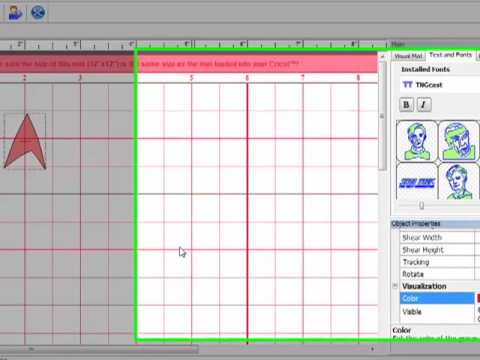
* There is two side windows: one labeled MAIN with three tabs= Visual Mat, Text & Fonts, Custom Shapes. Below the MAIN window is the OBJECT PROPERTIES: location (on mat) and size (length & width), Transformations (rotate, scale height/width, shear height/width which skews the object) and Tracking= still working on what this does and Visualization where you color your various objects and tell it whether to show color or not.
* To rotate in the Object Properties rotate box type in a degree from 1-359 (full circle is 360) to turn or can use a negative number up to 359 too.
* Love the red “alignment” lines on this software for making accurate placements! When you move an object they appear for both horizontal and vertical alignment! Too cool!
Anyway, my three cents!
Kris in AK
funamom at yahoo dot com
Thanks so much Kris! 🙂 That’s awesome!!! 🙂 You are great for adding!!! 🙂
Thanks, Megan! That helps a lot. I did fiddle with the trial version but didn’t get it. I’ve never used SCAL before, either, and would like it if you could demo how to get what is on the screen to the cricut…. and make the actual cuts. Thanks again!
WONDERFUL!!!! I’ll have to DL the trial version of SCAL and compare but I do believe I may be investing in the MTC.
I am so out of the loop of all the scal and mtc stuff. I don’t even know how connect the cricut with the computer?!? Please help! lol If you could just kinda explain how to get started, I could figure out from there! Thanks so much in advance Megan!
-Alyson
thescrapbookinglife@gmail.com
Hi,
On a lot of the Cricut carts when you do layers the base piece will have little cuts on it to help you put the layers where they belong, does this software do that or do you just have to eyeball it?
Thanks,
Sherry
Megan, you are AWESOME Girl, TY SO MUCH for this site and all your video’s! Happy New Year 🙂
I downloaded the trial version of Make the Cut and have been playing with it. I like the simplicity and ease of use. Sure Cuts Alot also looks very good and I was thinking of purchasing it before I found MTC. I bought Design Studio from eBay and it has never worked! I have worked with Cricut support several times and I have now given up on DS so I’m looking for a new product. Can’t quite decide. I look forward to your Pros and Cons test video.
Thanks. Barb.
Thanks again Megan & everyone else who has put in their 2 cents, but I still have a ?. I don’t really understand this SCAL/SVG stuff, I just know that when I try to download something that was done on SCAL, they say I can’t cut it because I don’t have the SCAL program. Will I be able to download these SCAL file to MTC & cut them now? Thanks ever so much!
I have never tried any of the software before. This one looks good, but what is involved in setting it up? What kind of computer do you need? What are the advantages of using this kind of software? (other than many image and font choices from various sources).
Could you offer an explanation to someone who is a complete newbie to this stuff?
Thanks!
Have been playing with the MTC software. Too much fun. I do not own Design Studio, SCAL or the Gypsy. And I’m glad I did not invest in them. This software is so easy even for me and I’m computer illiterate so my kids tell me. In just an hour, I have designed two new Christmas cards. Everyone should definitely check the software out.
Just thought you would like to know Clever Someday has posted on her blog a comparison chart for SCAL, Make the Cut, Inkscape, Cricut Design Studio and Gypsy it is an awesome comparison. Thought this would help.Also, SCAL has just made some updates to SCAL 2 with great new features.
Evelyn
Here is Clever Someday’s post
http://cleversomeday.wordpress.com/2009/12/22/cricut-software-comparison/
Awww, maaaaan. Clever Someday’s blog chart says MTC is not MAC-compatible (yet.) Maybe SOMEDAY!! lol.
Does Anybody Know What Program Is Better Make The Cut Or Scal? I Would Like To Buy One, But I Can Only Buy One And I Don’t Know What To Do.
Please Please Help!!!!!!!!!!!!!!!!!!
Thanks for the video. I am really considering purchasing this software. I am very interested in it, but didn’t want to buy another software program that I would have problems working with. You made it lood so easy to use and I like that. Keep the videos coming.
I thought I SCAL and now after watching this video I am not sure which program to buy! Totally torn…
Which do you like best now. Looking at mycricutbuddy.com comparison, it shows Make the Cut with more features